Part of our Workflow guides
Explore more articles on working faster, managing volume, and delivering efficiently in our Workflows section.
A photography workflow is the process you follow from planning a shoot to delivering the final images. A strong workflow helps you work faster, make better creative choices, and provide a consistent experience for every client.
Without a clear workflow, even a successful shoot can turn into a stressful process. Files get scattered, editing takes longer than expected, and delivery becomes unpredictable. Over time, this inconsistency affects both the quality of the work and your ability to scale.
This article walks through a practical photography workflow, from pre-shoot planning to capture, post-production, and final delivery. Each stage is designed to reduce friction, save time, and improve the experience for both photographers and clients.
Pre-Shoot Planning: Laying the Foundation
Pre-shoot planning lays the groundwork for an efficient photography workflow. The decisions you make before the shoot shape how smoothly images are captured, edited, and delivered. When preparation is clear, you reduce uncertainty, save time, and can focus on execution instead of troubleshooting on the day itself.
Most workflow issues appear after the shoot, but they usually begin long before it. When planning is rushed or vague, photographers often compensate by overshooting, over-editing, or scrambling during delivery. Thoughtful pre-shoot planning removes much of that pressure before you even pick up the camera.
When your creative direction is clear, decisions during the shoot become faster and more confident. You spend less time reacting and more time executing.
Define a Clear Purpose
Every shoot should begin with a clear purpose. Is the goal to capture moments, tell a story, create marketing assets, or document an event? Understanding how the images will be used helps guide creative choices, from framing and lighting to pacing and coverage.
Defining the goal also helps set boundaries. It prevents unnecessary shots that add volume without adding value, making the rest of the workflow easier to manage.
Create a Shot List and Timeline
A shot list acts as a roadmap during the shoot. It ensures that essential moments, people, or details are not missed, especially in fast-moving environments. While flexibility is still important, having a structure reduces mental load and keeps the shoot on track.
Timelines work alongside shot lists by helping you allocate time realistically. Knowing when key moments are expected allows you to anticipate rather than rush, which leads to stronger images and smoother transitions between scenes.
Scout and Plan the Location
Location planning affects both creative output and efficiency. Understanding lighting conditions, space limitations, and movement flow ahead of time allows you to visualize shots before you arrive.
Scouting locations, even briefly, can reveal potential challenges such as harsh lighting, restricted access, or cluttered backgrounds. Addressing these early prevents delays and compromises during the shoot itself.
Prepare and Test Your Gear
A reliable workflow starts with reliable gear. Preparing your equipment in advance minimizes technical hiccups and helps you stay focused on the shoot itself.
This means formatting and labeling memory cards, charging batteries, and packing lenses that suit the shoot’s needs. Bringing backups for critical items adds an extra layer of security, especially for long, complex, or high-pressure sessions.
Why Pre-Shoot Planning Matters
Strong preparation aligns your creative vision with your technical setup. When both are in sync, you can work more intuitively and with greater efficiency.
Thoughtful planning also saves time later in your workflow. Fewer mistakes during capture mean less fixing in post-production and fewer delays at delivery. Over time, this consistency becomes one of your biggest advantages.
During the Shoot: Capturing Efficiently

Efficient shooting is about creating strong images with intention, consistency, and minimal disruption to the rest of your photography workflow. When you shoot with efficiency in mind, you reduce the need for heavy corrections later and make post-production far more manageable.
How to Shoot Faster Without Losing Quality
Speed during a shoot comes from preparation and decisiveness, not rushing. Knowing your settings, your framing preferences, and your creative direction allows you to react quickly to moments without second-guessing yourself. Instead of adjusting for every frame, you work within a defined range that keeps your output consistent and reliable.
Shooting efficiently also means recognizing when a shot is already successful. Avoiding unnecessary variations saves time in both capture and culling.
Use Consistent Camera Settings
Consistent camera settings are one of the biggest contributors to a smooth photography workflow. Locking in exposure, white balance, and color profiles where possible helps ensure that images within the same scene look cohesive.
Manual or semi-manual modes can reduce unexpected shifts between frames, especially in controlled lighting environments. The more consistent the files are straight out of the camera, the easier they are to edit as a set rather than as individual images.
Use Repeatable Prompts and Poses
Prompts and repeatable poses help maintain flow, particularly when working with people. Instead of inventing new directions for every shot, having a set of reliable prompts allows you to guide subjects quickly while still leaving room for natural variation.
This approach works especially well for portraits, events, weddings and group photography, where consistency improves both visual cohesion and shooting speed.
Organize Files In-Camera
Organizing files in-camera can save significant time later. Using separate cards for different sessions, labeling cards, or leveraging camera features like folder separation helps keep files clean and easy to identify once transferred.
These small habits reduce confusion during file management and lower the risk of misplacing or overwriting images.
Build Consistency Through Repetition
Consistency improves with repetition. Dry practice, such as visualizing shots or rehearsing camera handling, builds muscle memory that translates into faster decision-making during real shoots.
Physical conditioning also plays a role, especially for long sessions or event coverage. Endurance, posture, and movement efficiency affect both speed and accuracy. Over time, repetition reinforces habits that make efficient shooting feel natural rather than forced.
With images captured efficiently and organized properly, the next step is getting those photos to clients and audiences while the excitement of the moment is still alive.
Instant Sharing: A New Stage in Modern Workflows

Traditional photography workflows often treat delivery as something that happens days or even weeks after a shoot. For fast-paced and emotion-driven shoots—like events, weddings, sports, concerts, and corporate activations—this delay can kill momentum.
By the time images are finally shared, the excitement of the moment has faded and engagement drops. What was once a highlight of the experience becomes just another file delivery.
Why Timing Matters in Photography
Timing plays a powerful psychological role in how photos are perceived. People are most emotionally connected to images immediately after a moment happens, when memories are fresh and energy is high.
Sharing photos during this window increases excitement, encourages interaction, and makes the images feel more valuable. Instant access turns photography into part of the live experience rather than a delayed recap.
How Instant Sharing Changes the On-Location Experience
This shift changes how photography works in practice. At events, guests can view and download photos while the experience is still unfolding. At weddings, couples can share early moments with friends and family the very same day. For brand activations and corporate events, real-time sharing extends the reach of the shoot beyond the physical space, driving immediate online engagement.
Tools That Make Instant Sharing Possible
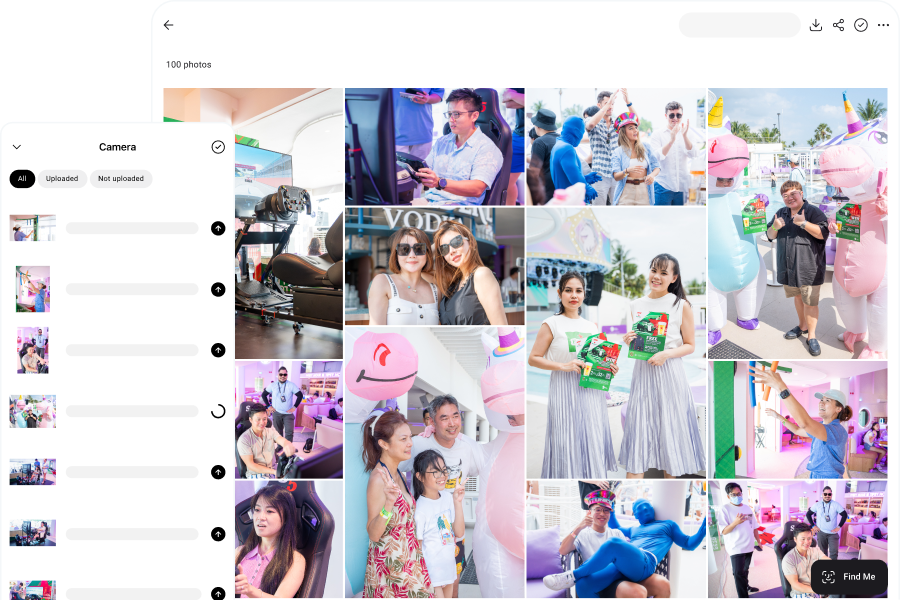
This is where modern tools like Honcho fit naturally into the workflow. With camera-to-cloud uploads, images become available online as soon as they’re captured. QR codes let guests and clients access galleries instantly, while face recognition helps them find their photos without scrolling through hundreds of images.
Built-in editing tools make it possible to refine selected photos right away, ensuring everything shared still meets professional standards.
By integrating instant sharing into the workflow, photographers move beyond traditional delivery timelines. The result is a faster, more engaging experience that benefits both the photographer and the audience receiving the images.
File Management and Backup: Protecting Your Work

File management is one of the most critical stages of a photography workflow, yet it is often treated as an afterthought. How images are transferred, organized, and backed up immediately after a shoot has a direct impact on both efficiency and data security. A clean process at this stage reduces confusion and protects the work you have just created.
Transfer Files Safely
Transferring files from camera to storage should be done carefully and consistently. Using reliable card readers and cables, avoiding interruptions during transfer, and confirming that files have been copied correctly before formatting cards are simple habits that prevent serious issues. Rushing this step increases the risk of incomplete transfers or corrupted files.
Create a Consistent Folder Structure
Once files are transferred, a clear folder structure and naming system make images easier to locate and manage later. Organizing by date, project, or client creates a logical archive that supports faster culling, editing, and delivery.
Consistency matters more than complexity. A simple structure that is used every time is far more effective than a detailed system that is applied inconsistently.
Back Up Your Files Properly
Backups are essential, not optional. Maintaining multiple copies of files across different storage locations protects against hardware failure, accidental deletion, and data corruption.
A common best practice is the 3-2-1 backup method, which involves keeping three copies of your files, stored on two different types of media, with one copy kept off-site. A solid backup strategy that reinforces the idea that data safety is an ongoing process rather than a one-time task.
Common File Management Mistakes
Many file losses are caused by avoidable mistakes. Accidental deletion, faulty memory cards or cables, interruptions during transfer, and outdated software are common culprits. Paying attention to these risk points and slowing down during file handling can save hours of recovery work, or worse, the permanent loss of important images.
Culling and Reviewing: Refining Your Selection

Culling is the process of refining a large set of images into a focused, high-quality selection. Done well, it significantly reduces editing time and helps maintain a strong visual narrative. Whether done manually or with the help of AI-assisted culling, the goal remains the same: identify the images that best represent the shoot.
Manual vs AI-Assisted Culling
Manual culling gives photographers full control over creative decisions, allowing for nuanced judgment based on emotion, timing, and context.
AI-assisted culling can speed up the process by identifying technical issues or grouping similar images, making it easier to review large volumes efficiently. Many workflows benefit from a combination of both approaches.
Narrow Down to the Strongest Images
Reviewing images efficiently means avoiding unnecessary perfectionism at this stage. The focus should be on eliminating unusable or redundant frames rather than fine-tuning details. Working quickly and decisively helps maintain momentum and prevents fatigue from slowing the rest of the photography workflow.
Narrowing down the selection creates a manageable set of images that are worth investing time into editing. Fewer, stronger images lead to more consistent results and a clearer story. Once selected, these images can be prepared for editing by applying basic flags, ratings, or color labels, setting the stage for a smoother post-production process.
Editing and Post-Production: Creating a Cohesive Look

Editing transforms raw images into a polished, cohesive set by bringing consistency and creative intent together. When handled efficiently, it elevates image quality while reducing the time spent on corrections or revisions later in the workflow.
Edit in Batches for Consistency
Batch editing plays a key role when working with large volumes of images, allowing global adjustments such as exposure, contrast, and color balance to be applied across a full set. Presets help reinforce visual consistency, making it easier to maintain a recognizable look across different shoots, clients, or environments.
Use AI Tools to Speed Up Editing
AI-powered tools can further speed up post-production by assisting with exposure balancing, color refinement, or selective enhancements, reducing the need for repetitive manual adjustments.
These tools work best when paired with a clear understanding of different editing approaches and visual styles, helping photographers apply automation without losing creative direction.
By combining batch editing, presets, and AI-assisted tools with intentional stylistic choices, you can streamline post-production while maintaining creative control and a consistent aesthetic throughout your work.
Client Delivery: Creating a Seamless Experience
Delivering photos smoothly is one of the final, yet most important, stages of a photography workflow. A seamless and intuitive delivery experience not only reflects professionalism but also leaves a lasting impression on clients. When accessing their images is straightforward, clients feel valued, engaged, and more likely to share their experience with others.
How Modern Tools Improve Client Delivery
Modern tools like Honcho take client delivery to the next level. Instead of juggling multiple links or sorting through folders, photographers can deliver images through a single online gallery. With built-in face recognition, clients can instantly find every photo they appear in, eliminating the frustration of searching manually.
This approach makes delivery fast, immediate, and effortless for both the photographer and the client, while also reducing follow-up requests to locate missing images.
By streamlining the delivery process, photographers save time and create a better overall experience. Clients receive their images quickly, share them with friends and family, and the workflow remains organized and efficient from start to finish. In this way, the delivery stage reinforces professionalism, enhances client satisfaction, and strengthens the relationship for future collaborations.
Conclusion
A clear photography workflow helps you work efficiently, maintain consistency, and deliver a better experience for clients. By planning ahead, capturing and organizing images thoughtfully, editing effectively, and using tools like instant sharing and face recognition for smooth delivery, you can focus on creativity while keeping your workflow professional and streamlined.
Frequently Asked Questions
A photography workflow is the complete process you follow from planning a shoot to delivering the final images. It includes pre-shoot preparation, capturing photos, organizing files, culling, editing, backing up, and client delivery. A strong workflow reduces stress, saves time, and ensures consistent results.
Without a clear workflow, even great shoots can become chaotic. Files get lost, editing drags on, and delivery becomes unpredictable. A structured workflow helps you stay organized, work faster, avoid mistakes, and scale your business more easily.
Instant sharing is especially valuable for fast-paced, emotion-driven shoots like events, weddings, sports, concerts, school photography, and brand activations. In these situations, timing matters. Sharing photos while excitement is still high leads to stronger engagement and better client experiences.
Use a consistent folder structure and naming system. Many photographers organize by date, client name, or project type. The key is consistency, and simple systems that are used every time are more effective than complex systems that aren’t.
A widely recommended approach is the 3-2-1 rule: keep three copies of your files, on two different types of storage, with one copy stored off-site. This protects your work from hardware failure, accidental deletion, and data corruption.
Yes, AI tools can significantly speed up culling and editing by identifying technical issues, grouping similar shots, and making basic adjustments. However, they work best when combined with human judgment to preserve creative intent.
A great delivery experience is simple, fast, and intuitive. Clients should be able to access their photos easily, find what they’re looking for quickly, and share images without friction. The easier the experience, the more professional it feels.
Face recognition allows clients to instantly find all photos they appear in, without scrolling through hundreds of images. This makes large galleries easier to navigate and improves the user experience.