
Part of our Workflow guides
Explore more articles on working faster, managing volume, and delivering efficiently in our Workflows section.
For most photos you share online or deliver through a client gallery, choose sRGB. Adobe RGB may be more suitable for certain editing and printing workflows. Ultimately, the right choice depends on how your photos will be used.
What is the difference between sRGB and Adobe RGB?
Both sRGB and Adobe RGB are color spaces that define the colors in a digital image. The main difference is the range of colors each can represent, known as a color gamut.
Think of two boxes of colored pencils. One has the familiar shades you’d use for most drawings, while the other adds colors the smaller box can’t make. Adobe RGB is the bigger box, particularly for certain shades of green and cyan. But if a photograph only contains colors that fit within sRGB, the extra range won’t make it look any better.
What is sRGB?
sRGB is the standard color space for sharing photos online. It’s widely supported by browsers, apps, and devices, making it a reliable choice when your photos will be viewed on different screens. That’s why it’s generally recommended for online galleries and client delivery.
What is Adobe RGB?
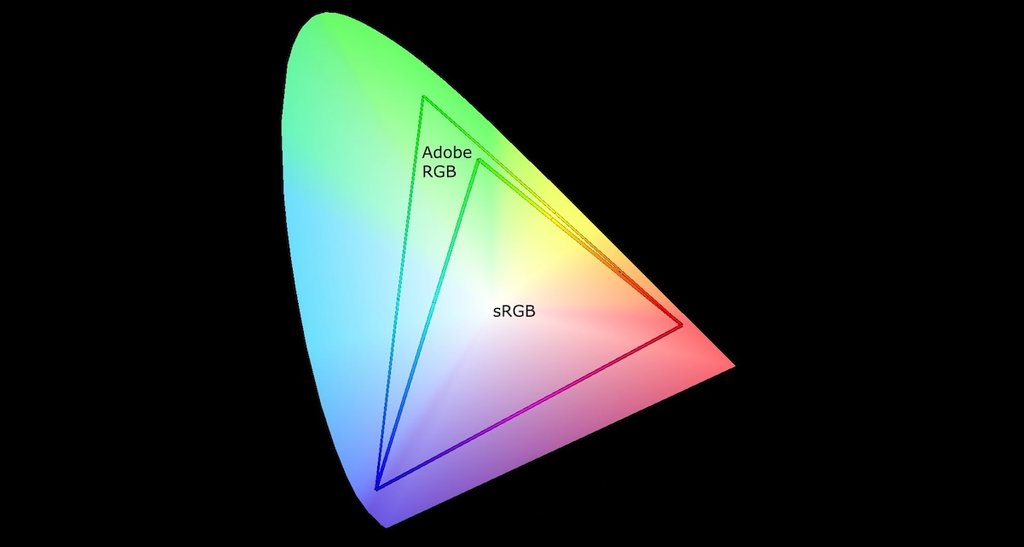
Adobe RGB can represent a wider range of colors than sRGB, particularly certain shades of green and cyan. This can be useful when editing photos or preparing images for printers that support Adobe RGB.
The diagram below shows the range of colors each color space can represent. Notice how Adobe RGB covers a larger area, particularly toward green.
When should you use sRGB or Adobe RGB?
Here’s what we’d recommend for different situations.
| Use case | Recommended color space |
|---|---|
| Online sharing and client galleries | sRGB |
| Printing | Follow your print lab’s requirements (often sRGB) |
| Commercial photography and design | Follow your client’s requirements |
| Photo editing | Edit in a wide color space, then choose the appropriate color space when exporting |
For online sharing and client galleries
While modern browsers can display Adobe RGB images correctly, not every app or service handles it consistently. Using sRGB reduces the risk of unexpected color changes when photos are shared or downloaded.
For printing
Adobe RGB’s wider range of colors can be beneficial for certain printing processes, but many print labs require sRGB. Always follow your print lab’s color-space requirements rather than assuming Adobe RGB is better for printing.
For commercial photography and design
Publishers and agencies may request sRGB, Adobe RGB, or another color space depending on how the images will be used.
Follow your client’s specifications, and ask if they haven’t provided any.
For photo editing
Editing in a wide color space allows you to retain more color information, while choosing the appropriate color space when exporting your finished photos.
If you’re editing RAW files in software like Lightroom, the working color space is managed automatically. You only need to select the output color space when exporting.
For existing JPEGs, converting an sRGB image to Adobe RGB won’t restore colors that weren’t present in the original file.
For more details on preparing your finished photos, see our Lightroom export settings for client galleries.
Why do photos look different after sharing them?
Photos can sometimes look different after sharing, even when you haven’t made any edits. This can happen because of how color profiles are handled, or differences between screens and apps.
A color profile tells apps which color space a photo uses, such as sRGB or Adobe RGB, so they can display its colors correctly. If an Adobe RGB photo loses its color profile and an app assumes it’s sRGB, the colors may appear less saturated.
Problems can also occur when changing between color spaces. There are two ways to do this:
- Converting: Adjusts the colors to keep the photo looking as close to the original as possible in the new color space.
- Assigning: Changes the photo’s color profile without adjusting its color values. This can cause the photo to look different because those values are now interpreted differently.
For example, if you want to change an Adobe RGB photo to sRGB for online sharing, you should convert it, not simply assign a new profile. This helps preserve the photo’s original appearance.
Finally, even with the correct color profile, photos won’t look identical on every screen.
Frequently asked questions
If you’re shooting JPEGs, choose sRGB for general photography and online sharing. Use Adobe RGB if you have a specific need for its wider range of colors.
If you’re shooting RAW, the camera’s color-space setting doesn’t limit the colors available in your RAW files. However, it may affect the previews displayed on your camera.
Yes. JPEG is a file format, while Adobe RGB is a color space. A JPEG can use either sRGB or Adobe RGB.